


Jamabandi Haryana Land Records
Jamabandi is Haryana's official land record showing ownership, cultivation and rights details for a plot, revised every five years by the Patwari and attested by the Revenue Officer. The Jamabandi Haryana portal lets residents check mutation status, view registered deeds, download Nakal and access Records of Rights online.

Features and Benefits of Jamabandi
Below are the features and benefits of the Jamabandi portal:
- Checklist for Deed Registration.
- Standard Operating Procedure (SOP) for Deed Registration.
- Deed templates.
- Collector rates.
- Check Deed appointment availability.
- View registered Deeds and stay orders.
- Controlled/urban area details.
- Nakal details by owner name.
- View mutation orders.
- Check the status of the mutation.
- Mutation status of Deeds.
- View cadastral maps.
- Check revenue court status or civil court status.
- Check property tax details.
- Integrated property wise transaction details.
Also, you can find details about:
- Owner of the property
- Kashatkar
- Makbuja
- Total land
- Irrigation
- Majrua
- Gair majrua
- Khewat/khatoni
How to Check Availability of Deed Registration Appointment Slots in Jamabandi
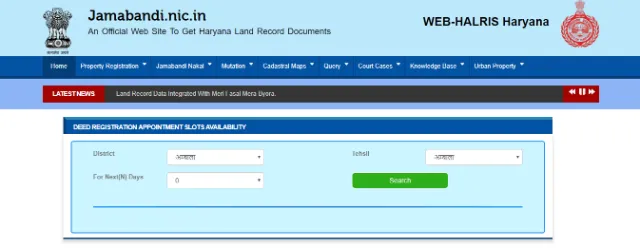
Below are the steps to check the availability of the Deed registration appointment slots through the Jamabandi portal:
- Visit Jamabandi Appointment Slots
- Select the district, tehsil and choose the number of days you would like to know the availability of slots.
- Upon searching, you'll be able to view the availability of the slots.
How to View Jamabandi Land Nakal Online
To view the Nakal record through the Jamabandi website, follow the below steps:
- Visit Jamabandi Nakal Record.
- Here you can choose to search by owner name/khewat/khasra/date of mutation.
- Select the district, tehsil/sub-tehsil, village, and the Jamabandi year.
- Select the owner and you'll be able to view the Nakal details.
How to Search Registered Deeds Online in Haryana
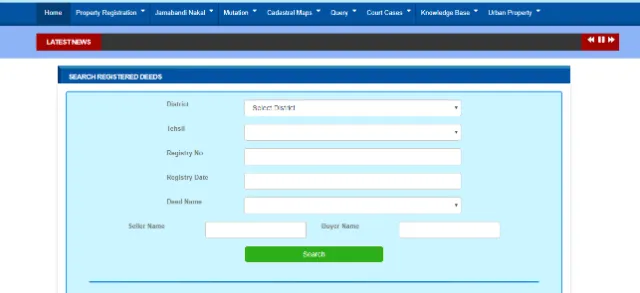
The Jamabandi portal lets you search for registered deeds online. Below are the steps:
- Visit Jamabandi Land Registered Deeds.
- Select the district, tehsil, registry number, registry date, deed name, the seller name, and the buyer name.
- Click on 'search' and you'll be able to find registered deeds.
How to Search Court Cases and Download Order Online
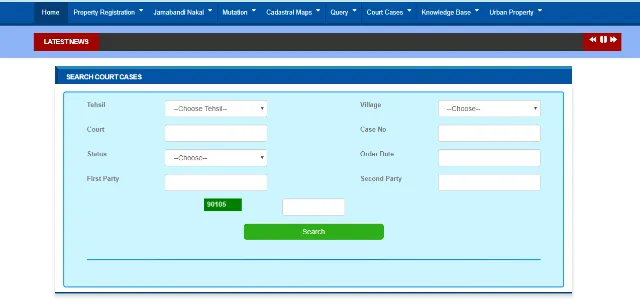
If you want to find out court cases, if any, on a property and download the order online, you should:
- Visit Jamabandi Court Case Order Online.
- Select the tehsil, village, court, case number, status (stay/attachment/disposed), order date, first and the second party, and enter the captcha code.
- Upon clicking on 'Search' you'll be able to find the court case and download the order.
How to View Mutation Orders in Jamabandi
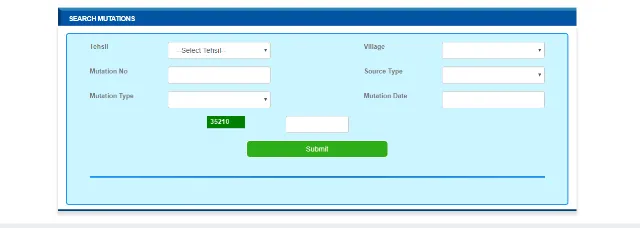
To view mutation orders through the Jamabandi website, follow the below steps:
- Visit Jamabandi Mutation Orders.
- Select details such as tehsil, village, mutation number, source type, mutation type, and the mutation date.
- Click on 'Submit' to view the mutation order.
How to Check Mutation Status Online
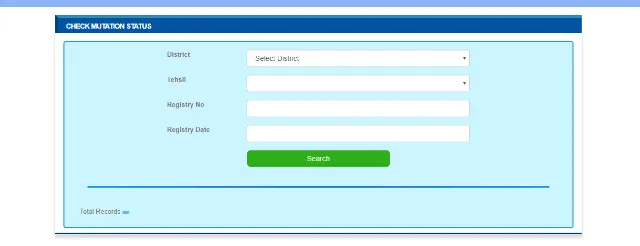
To know the status of a mutation online, follow the below steps:
- Visit Jamabandi Mutation Status.
- Select the district, tehsil, registry number, and date.
- Upon clicking on 'Search', you'll be able to check the mutation status.
What is mutation?
Mutation relates to the changes required to be made regarding the title and ownership of land.
- Sale
- Gift
- Exchange
- Mortgage with possession
- Mortgage without possession
- Mutation of changes in ownership due to decrees in civil court
- Mutation of inheritance
- Partition
- Land term leases
- Redemption of mortgage
Mutation Fee
For entries related to the acquisition of an interest or right by a registered deed or an order of court or a decree or order of a Revenue Officer affirming or making a partition under Chapter IX of the Punjab Land Revenue Act, 1887, or if directing the incorporation in the record of acquisition of an interest or right by inheritance, or a private partition.
This will be service charges per mutation which has to be deposited at the district level at the District Information Technology Society (DITS).
How to View Cadastral Map in Jamabandi

To view the cadastral map:
- Visit jamabandi Cadastral Map Online.
- Under the drop-down menu, select 'Cadastral Maps' and choose 'View Cadastral Maps'.
- You'll be re-directed to https://hsac.in/eodb/login.
- Here you can search by district, tehsil or village, or all.
How to Check a Revenue Court Case Status in Jamabandi
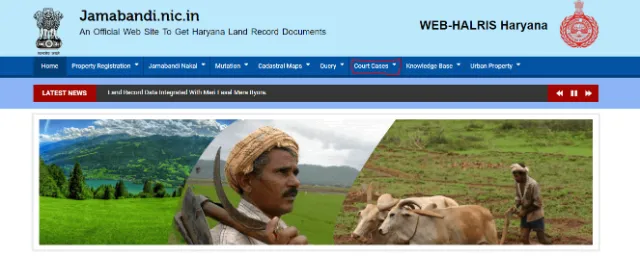
Jamabandi offers the service to check revenue court cases' status online. Below are the steps:
- Visit Jamabandi Official Site.
- Under the drop-down menus, select 'Court Cases'.
- Select 'Revenue Court Status' and you'll be re-directed to Haryana Revenue Courts Site.
- On the left-hand side of the page, select 'View Case Status'.
- Enter the required details such as location, court, petitioner advocate or petitioner name, case ID or case number and click on submit to view the status.
How to Check Civil Court Case Status in Jamabandi
To check a civil court case status online, follow the below steps:
- Visit Jamabandi Land Record Case Status.
- Enter the required information such as district, tehsil, village, mustil, and khasra number.
How to Register an Immovable Property in Jamabandi
Below are the steps to register an immovable property:
Step 1 - All information pertaining to the property value as per the rate of the Collector, charges such as stamp duty, service charges, registration fee as well as the instrument formats can be procured from the respective Joint Sub-Registrar/Sub-Registrar's office HARIS counter.
Step 2 - Based on the property value at the rate of the Collector, stamp papers with value of up to Rs.10,000 can be procured from stamp vendors and for stamp duty of more than Rs.10,000, stamp papers can be procured from the treasury office after the required amount is deposited in the SBI with "0030-Stamp and Registration" as the under head.
Step3 - Upon obtaining the required stamp papers, you can write the document, or it can be written by a document writer, and two witnesses are required during the execution of the process. Along with the stamp papers, you'll have to submit a copy of the title deed, copy of the map, Jamabandi, digital photograph, plan, etc.
Step 4 - The set of documents along with the stamp papers needs to be submitted to the respective Sub-Registrar office where the property is located.
Step 5 - The submitted documents will be examined carefully by the Sub-Registrar and the amount paid towards stamp duty, service charges, and the registration fee through the HARIS system.
Step 6 - After the scrutiny of documents, you'll have to appear before the Joint Sub-Registrar/Sub-Registrar for the entry of the said document. To authenticate the executant's identity, two witnesses are required to be present.
Step 7 - Upon endorsing the entry of the executant by the Joint Sub-Registrar/Sub-Registrar, subject to adherence to procedures, the respective Sub-Registrar will include the registration certificate, through the computerised HARIS system, on to the documents.
Current stamp duty rates in Haryana, as published on the Jamabandi portal, are:
Instrument | Rural Areas | Urban Areas |
Conveyance/Sale Deed | 5% | 7% |
Gift Deed | 3% | 5% |
Sale Deed in favour of a woman | 3% | 5% |
Exchange Deed | 5% of the greatest value of one share | 7% of the greatest value of one share |
General/Special Power of Attorney | Rs.100/Rs.300 | Rs.100/Rs.300 |
Partnership Deed | Rs.22.50 | Rs.22.50 |
How to check collector rates on the Jamabandi Portal
To check collector rates on the Jamabandi portal, you need to follow the steps mentioned below:
- Visit Jamabandi Official Website
- Click on 'Collector rates' under the 'Property Registration' tab
- Select correct 'District', 'Tehsil', 'Period' and 'Village' from the drop-down menu
- Click on 'Submit'
- You will be displayed the rates as per segment, property and property sub-type
Find Land Records in Other States
Schemes and Acts
- Pradhan Mantri Awas Yojana - Urban - PMAY(U)
- Pradhan Mantri Awas Yojana Gramin Online (PMAYG)
- Pradhan Mantri Awas Yojana - Urban 2026
- Real Estate (Regulation and Development) Act, 2016
- Stamp Duty and Registration Charges 2026
- Encumbrance Certificate (EC)
- Delhi Development Authority (DDA) Housing Scheme
- Land Records 2026
FAQs on Jamabandi Haryana Land Record
1.What is Jamabandi in Haryana?
Jamabandi is Haryana's official land record showing the Record of Rights, cultivation details and ownership information for a plot. It is prepared by the Patwari and attested by the Revenue Officer, with one copy kept at the District Record Room and one with the Patwari.
2.How often is the Jamabandi Haryana land record updated?
The Jamabandi Haryana land record is revised every five years. The Patwari compiles the updated record and the Revenue Officer attests it before it is filed.
3.Which department runs the Jamabandi Haryana portal?
The Jamabandi Haryana portal is run by the Revenue Department of Haryana. It digitises land records so residents can view mutation, registration and Records of Rights details online instead of visiting an office.
4.What can I check on the Jamabandi Haryana portal?
The Jamabandi Haryana portal lets you check Deed registration appointments, registered Deeds, mutation orders and status, cadastral maps, and court case status. You can also view owner, khewat/khatoni and land-area details for a plot.
5.How do I check Deed registration appointment slots on Jamabandi Haryana?
You can check Deed registration appointment slots on the Jamabandi Haryana portal by selecting your district and tehsil and the timeframe you want to view. The portal then shows the available slots for booking.
6.How do I view a Jamabandi Haryana land Nakal online?
You can view a Jamabandi Haryana land Nakal online by searching the Nakal Record section by owner name, khewat, khasra or mutation date. Select your district, tehsil, village and Jamabandi year, then choose the owner to view the Nakal.
7.How do I search registered deeds on the Jamabandi Haryana portal?
You can search registered deeds on the Jamabandi Haryana portal by entering the district, tehsil, registry number or date, and the deed, seller or buyer name. The portal then displays the matching registered deeds.
8.How do I search court cases on Jamabandi Haryana and download the order?
You can search court cases on the Jamabandi Haryana portal by selecting the tehsil, village, court and case details and entering the captcha code. Once you search, you can download the order for a matching case.
9.How do I view mutation orders on Jamabandi Haryana?
You can view mutation orders on Jamabandi Haryana by selecting the tehsil, village, mutation number, source type, mutation type and date. Submitting these details displays the relevant mutation order.
10.How do I check mutation status on Jamabandi Haryana?
You can check mutation status on Jamabandi Haryana by entering the district, tehsil, registry number and date on the Mutation Status page. Searching these details shows where the mutation stands.
11.What is mutation under the Jamabandi Haryana land record?
Mutation under the Jamabandi Haryana land record is the process of updating the title and ownership details of a plot in the record. It is carried out whenever ownership changes, such as through sale, gift, inheritance or partition.
12.What kinds of mutation are recorded in Jamabandi Haryana?
Jamabandi Haryana records mutation arising from sale, gift, exchange, mortgage, court decree, inheritance, partition, long-term lease and redemption of mortgage. Each type updates the ownership or interest recorded against the plot.
13.Is there a fee for mutation under Jamabandi Haryana?
Yes, a mutation fee applies under Jamabandi Haryana and is payable when the mutation entry is made. The current fee is listed in the Mutation Fee section above.
14.How do I view the cadastral map on Jamabandi Haryana?
You can view the cadastral map on Jamabandi Haryana by selecting 'Cadastral Maps' and then 'View Cadastral Maps' from the portal menu. You are then taken to the HSAC portal, where you can search by district, tehsil or village.

Karishma VP has over a decade of experience in content writing which includes over five years specializing in personal finance. Her career in BankBazaar has given her the opportunity to write on a wide variety of financial products ranging from credit cards and home loans to insurance policies and government schemes. She believes that an understanding of personal finance is an important step to leading an independent, empowered life. This has led to her being passionate about learning more about the BFSI sector and writing about personal finance as clearly, concisely, and accurately as possible to make it accessible to a larger audience through BankBazaar.

Disclaimer
Credit Card:
Credit Score:
Personal Loan:
Home Loan:
Fixed Deposit:


Copyright © 2026 BankBazaar.com.