


How to Activate SBI ATM PIN?
You can activate your SBI ATM PIN, known as the Green PIN, through an SBI ATM, the YONO SBI app, SMS, net banking, or customer care. This paperless method replaces the mailed PIN and lets you set your debit card PIN securely without visiting a branch. Choose any channel below to generate your PIN in minutes.
Once you generate and activate your SBI Debit Card ATM PIN using the Green PIN facility, you can securely access your account, withdraw cash from ATMs, and carry out transactions at merchant outlets and online. Read on to learn about the different ways to generate or activate your SBI Debit Card ATM PIN.
What is SBI Debit Card Green PIN?
To simplify debit card PIN generation, State Bank of India (SBI) offers the Green PIN facility. This paperless service replaces the traditional PIN mailer, allowing customers to securely generate or set their debit card PIN on their own through various digital and self-service channels. Introduced as part of SBI's green initiative, the Green PIN promotes eco-friendly banking while providing a quick and convenient way to activate your debit card PIN.

SBI Green Pin - How to generate?
SBI Green Pin is a One-Time Password and can be generated through SBI ATM or SBI Quick App or SMS banking.
Through SBI ATM (Recommended for initial generation)
- Step 1: Insert your debit card at an SBI ATM.
- Step 2: Select the "PIN Generation" option.
- Step 3: Enter your 11-digit Bank Account Number and confirm.
- Step 4: Enter your 10-digit Registered Mobile Number and confirm.
- Step 5: The bank will send the Green PIN (OTP) via SMS to your registered mobile number.
Through SMS Banking
- Step 1: Send an SMS to 8655807197 in the following format: PIN <Last four digits of your Debit Card No.> <Last four digits of your Account No>
- Step 2: The bank will send the Green PIN (OTP) via SMS.
SBI Debit Card PIN Generation Methods
SBI allows customers to generate or set their debit card PIN through both online and offline channels. You can choose any of the following methods based on your convenience:
- By visiting an SBI ATM
- By sending an SMS from your registered mobile number
- By using SBI Net Banking
- By generating the PIN through the YONO SBI app
- By contacting the SBI Customer Care
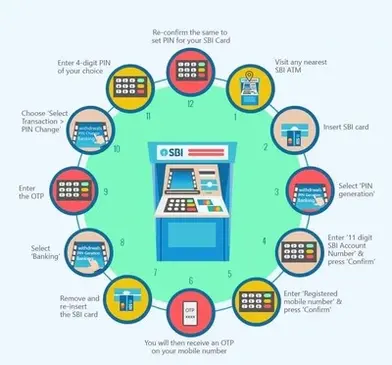
How to Generate SBI Debit Card PIN through an ATM?
Follow the steps given below to generate your SBI Debit Card PIN through ATM:
- Step 1: Visit any SBI ATM and insert/swipe your debit card.
- Step 2: Choose the ‘PIN Generation’ option from the menu.
- Step 3: Type in your 11-digit account number and press Continue.
- Step 4: Enter your registered mobile number and tap Confirm.
- Step 5: You will receive an OTP/ Green Pin on your phone.
- Step 6: Enter the Green Pin to validate your request.
- Step 7: Set a 4-digit PIN of your choice and confirm. A success message will appear once your PIN is created.
How to Generate SBI Debit Card PIN through Internet Banking?
Follow the steps given below to generate your SBI Debit Card PIN through Internet Banking:
- Step 1: Sign in to your SBI Net Banking account and open the ‘Cards’ section.
- Step 2: Select the ‘Debit Cards’ option.
- Step 3: Under the ‘Request’ tab, click on ‘Instant PIN Generation’.
- Step 4: Enter your debit card number and set a new 4-digit PIN.
- Step 5: You will have to fill in the OTP sent on your registered mobile number. Once verified, your new PIN will be successfully activated.

How to Generate SBI Debit Card PIN through SMS
You can also generate the Green PIN by sending a simple message from your registered mobile number.
- SMS PIN ABCD EFGH (ABCD represents the last four digits of the debit card number and EFGH represents the last four digits of the bank account number linked to the debit card) to 8655807197
- Once the SMS is sent successfully, you will receive a Green PIN (OTP) on your registered mobile number. This OTP remains valid for two days and can be used at any SBI ATM to generate your new debit card PIN by following the PIN generation steps.
How to Generate SBI Debit Card PIN by Calling SBI Customer Care
Alternatively, you can call the SBI credit card customer care helpline to receive card PIN on your registered mobile numbers.
Step 1: You can call any one of the following SBI Customer Care numbers to generate your debit card pin, 1800 425 3800,1800 11 22 11, or 080 2659 9990.
Step 2: Follow the instructions and select 2 for 'ATM and Prepaid Card Services' option
Step 3: Select '1' to generate a Green PIN
Step 4: The system will ask you to enter your debit card number. Enter the number and confirm it
Step 5: The system will ask you to enter the account number linked to your debit card. Enter the number and confirm it
Step 6: Once you confirm all the details, you will receive an SMS with One Time Password (OTP), which will be valid for two days, during which you can visit any of the SBI ATMs to generate your debit card PIN.

Debit Card PIN Generation Using YONO SBI App
Debit Card PIN generation can be done conveniently using the YONO SBI App as it allows you to set your PIN digitally without having to visit an ATM.
Follow the steps given below for generation of Debit Card PIN using the YONO SBI App:
- Step 1: Open the YONO SBI App and log in using your MPIN or Internet Banking User ID and password.
- Step 2: From the dashboard, navigate to the "Cards" section or the "Service Request" menu.
- Step 3: Choose the "ATM/Debit Card" or "My Debit Cards" option.
- Step 4: Select the "Set/Reset ATM PIN" option.
- Step 5: Select the specific debit card and the associated bank account for which you want to generate the PIN.
- Step 6: An OTP (One-Time Password) will be sent to your registered mobile number. Enter this OTP in the app to authenticate the request.
- Step 7: You will be prompted to enter your desired new 4-digit PIN and then re-enter it for confirmation.
- Step 8: Click "Submit" to complete the process. A successful PIN generation message will be displayed on the screen and confirmed via SMS.
Steps to Reset or Regenerate SBI Debit Card PIN
Given below are the steps to reset your SBI Debit Card PIN:
- Step 1: Log in to the SBI online banking portal.
- Step 2: Navigate to the ‘Cards’ section and choose ‘Debit Cards’.
- Step 3: Select the ‘PIN Reset/Regeneration’ option from the ‘Request’ tab.
- Step 4: Choose the debit card number for which you want to regenerate the PIN.
- Step 5: Click on ‘Continue’ and specify the reason for the PIN change.
- Step 6: An OTP will be sent to your registered mobile number.
- Step 7: Visit any State Bank ATM to complete the process.
- Step 8: Insert your card and select the option for ‘SBI New ATM PIN Generation using OTP’.
- Step 9: Enter the OTP sent to your mobile number.
- Step 10: Provide your registered mobile number and proceed.
- Step 11: Finally, create a new ATM PIN and confirm it.
Summary
Activating your SBI ATM PIN through the Green PIN facility is a quick, paperless process you can complete via an SBI ATM, the YONO SBI app, SBI Net Banking, SMS, or customer care. Each method sends an OTP to your registered mobile number to verify your identity before you set a new 4-digit PIN. Choose the channel that suits you best to start using your SBI debit card securely.



FAQs on SBI Green PIN Generation
1.Why did SBI introduce the green PIN?
SBI introduced the Green PIN as part of its paperless banking drive, replacing the printed PIN mailer with a self-service way to activate your SBI ATM PIN. It benefits both customers and the bank by removing the need to print and post physical PIN mailers.
2.Can I change my SBI ATM PIN online without visiting a branch?
Yes, you can change or reset your SBI ATM PIN online using SBI Net Banking or the YONO SBI app without visiting a branch. The SBI Green PIN facility is designed to let you complete this entirely through self-service channels.
3.Can I use my SBI debit card before generating my SBI Green PIN?
No, you must first generate your SBI ATM PIN through the Green PIN facility before you can use your SBI debit card for any transaction. Setting the PIN is a mandatory first step for ATM, POS, or online use of the card.
4.Is the SBI Green PIN OTP sent to a mobile number that is not registered with SBI?
No, the SBI Green PIN OTP is sent only to the mobile number registered with SBI for that debit card. If your number has changed, update it with the bank first, or the OTP will not reach you.
5.Can SBI send my Green PIN to a different mobile number if I call customer care?
No, even when you call SBI Customer Care to generate your SBI ATM PIN, the OTP can only be sent to the mobile number already registered with the bank. Requesting delivery to an unregistered number is not possible.
6.Why is the SBI ATM PIN called a Green PIN?
It is called a Green PIN because it lets you activate your SBI debit card PIN digitally, without the paper PIN mailer that banks used to print and post to customers. This paperless approach is part of SBI's environment-friendly banking initiative.
7.Can I modify my SBI ATM PIN after it has been generated?
Yes, you can change your SBI ATM PIN at any time using SBI Net Banking, the YONO SBI app, an SBI ATM, SMS banking, or the toll-free customer care helpline. Use whichever channel is most convenient for you.
Types of Credit Card
- Top 10 Credit Cards in India
- Fuel Credit Cards
- Lifetime Free Credit Cards
- Kisan Credit Card
- Student Credit Cards in India
- Shopping Credit Cards
- Contactless Credit Cards
- Travel Credit Cards
- Co-Branded Credit Cards
- Lifestyle Credit Cards
- Rewards Credit Cards
- Business Credit Cards
- NRI Credit Cards
- Cashback Credit Cards
- Lounge Access Credit Cards
Credit Card by Banks
- Axis Bank Credit Card
- HDFC Bank Credit Card
- Kotak Bank Credit Card
- Federal Bank Credit Card
- SBI Credit Cards
- HSBC Credit Card
- IndusInd Bank Credit Card
- RBL Bank Credit Card
- Standard Chartered Credit Card
- YES Bank Credit Card
- Canara Bank Credit Card
- Punjab National Bank Credit Card
- Bank of Baroda Credit Card
- IDBI Credit Card
- Union Bank of India Credit Card
- Bank of India Credit Card
Articles on Credit Card
- How to Check Credit Card Status
- How to Manage Multiple Credit Cards
- Best Credit Card for Poor Credit
- How to get Credit Card without Job
- Credit Card Insurance Benefits
- How to Apply for Lost Credit Card
- Reasons for Credit Card Rejection
- Advantages & Disadvantages of Credit Card
- Difference between Credit Card & Debit Card
Credit Card Customer Care
- SBI Credit Card Customer Care
- HDFC Bank Credit Card Customer Care
- Axis Bank Credit Card Customer Care
- Federal Bank Credit Card Customer Care
- IndusInd Bank Credit Card Customer Care
- PNB Credit Card Customer Care
- RBL Bank Credit Card Customer Care
- Kotak Credit Card Customer Care
- Yes Bank Credit Card Customer Care
- Standard Chartered Credit Card Customer Care
- Canara Bank Credit Card Customer Care
- HSBC Credit Card Customer Care
- Indian Bank Credit Card Customer Care
- Bank of Baroda Credit Card Customer Care
- Bank of India Credit Card Customer Care
- Union Bank of India Credit Card Customer Care
Credit Card Bill Payment
- Credit Card Bill Payment
- SBI Credit Card Bill Payment
- HDFC Credit Card Bill Payment
- Federal Bank Credit Card Bill Payment
- Axis Bank Credit Card Bill Payment
- IndusInd Credit Card Bill Payment
- Kotak Credit Card Bill Payment
- Standard Chartered Credit Card Bill Payment
- RBL Bank Credit Card Bill Payment
- HSBC Credit Card Bill Payment
- PNB Credit Card Bill Payment
- Canara Bank Credit Card Bill Payment
- Bank of Baroda Credit Card Bill Payment
- Bank of India Credit Card Bill Payment
- Union Bank Credit Card Bill Payment
Credit Card Eligibility
- Credit Card Eligibility
- SBI Credit Card Eligibility
- HDFC Credit Card Eligibility
- Federal Bank Credit Card Eligibility
- Axis Bank Credit Card Eligibility
- Yes Bank Credit Card Eligibility
- IndusInd Bank Credit Card Eligibility
- HSBC Credit Card Eligibility
- Kotak Credit Card Eligibility
- Canara Bank Credit Card Eligibility
- Standard Chartered Credit Card Eligibility
- RBL Bank Credit Card Eligibility
- Bank of Baroda Credit Card Eligibility
- Union Bank Credit Card Eligibility

Disclaimer
Credit Card:
Credit Score:
Personal Loan:
Home Loan:
Fixed Deposit:


Copyright © 2026 BankBazaar.com.